
See staffing gaps weeks before they open.
GlobalKCompass puts demand forecasting, capacity planning, what-if scenarios and manpower cost into one weekly plan. An AI planner reads it with you, flags the weeks at risk and recommends what to do.
Short 83 FTE-weeks before the new class is ready
A class of 200 new hires joins in W44
| Week | Required FTE | Available FTE | Gap |
|---|---|---|---|
| W41 | 176.2 | 139.3 | -36.9 |
| W42 | 176.2 | 147.7 | -28.5 |
| W43 | 176.2 | 158.1 | -18.1 |
| W44 | 176.2 | 250.3 | 74.1 |
| W45 | 176.2 | 187.1 | 10.9 |
| W46 | 167.8 | 194.9 | 27.1 |
| W47 | 167.8 | 193.4 | 25.6 |
| W48 | 167.8 | 191.9 | 24.1 |
| W49 | 167.8 | 190.5 | 22.7 |
Staffing problems show up in the data long before they reach the floor.
Most planning teams already have the numbers. They're spread across forecasts, rosters, hiring trackers and finance sheets, so the gap is found late, when the only fixes left are expensive.
Forecasts that don't reach the roster
Demand projections live in one file and staffing in another, so a volume change takes days to show up as a headcount need.
No single version of the plan
Each team keeps its own copy. Leadership sees totals that don't reconcile and can't tell which one is current.
Cost decided somewhere else
Staffing calls are made without the manpower cost and revenue impact next to them, then revisited when finance sees the bill.
Shortfalls found in the week they happen
By then, overtime and agency staff are the only options left, and both cost more than hiring or training on time.
Planners rebuilding spreadsheets
Most of the week goes into reconciling data and recalculating, which leaves little time to decide what to do about it.
Assumptions that differ by site
When each site plans with its own handle time, occupancy and shrinkage targets, reports can't be compared side by side.
One plan, from forecast to action.
Each stage feeds the next. A change in demand flows straight through to headcount, cost and the actions the AI planner recommends.
Forecast
Demand forecasting
Project contact volume and workload by week, then turn the projection into required FTE.
Plan
Capacity planning
Compare required with available FTE across the horizon and see the hiring need behind every gap.
Manpower cost
Track staffing cost next to capacity and revenue, so plans are judged in money as well as heads.
Simulate
Scenario planning
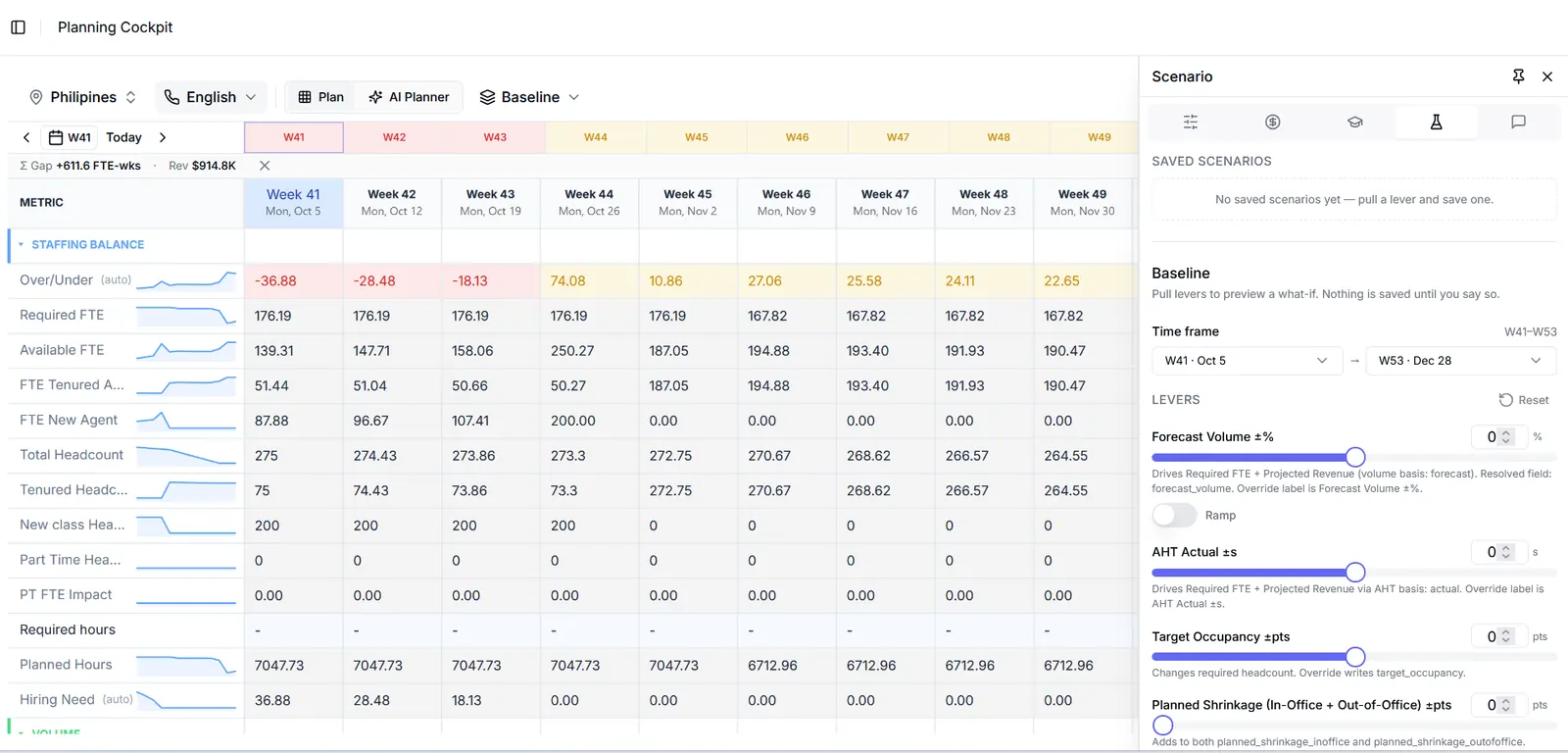
Change volume, handle time, occupancy or shrinkage and preview the effect before anything is committed.
Act
AI Planner Agent
Reviews the plan as it changes, explains where the risk is and recommends what to do.
Risk radar
Surfaces capacity gaps early, while there is still time to hire, train or reschedule.
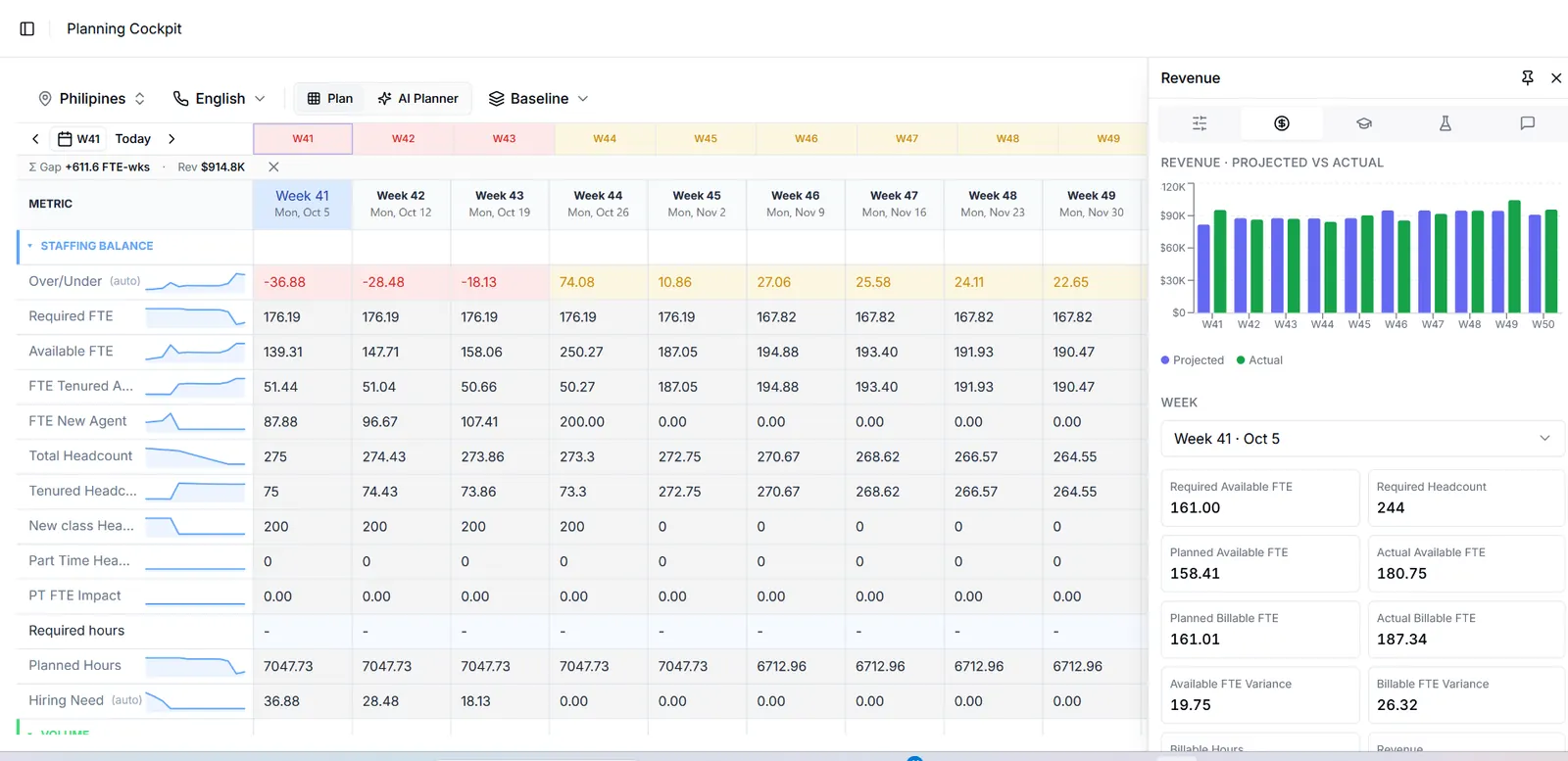
Every week's position on one screen.
The Planning Cockpit lays out the full staffing balance week by week: required and available FTE, tenured and new-hire capacity, headcount, hiring need and revenue.
- Under- and over-staffed weeks are colour-coded across the whole horizon.
- Every metric has an inline trend line, so direction is clear before you read a number.
- Projected and actual revenue sit in the side panel, next to the staffing balance.
Pull a lever. Watch the gap move.
Try it on the sample plan from the top of the page. In the product, the same four levers run against your full plan, and nothing is saved until you say so.
- Short
- 83 FTE-weeks
- Weeks short
- 3 of 9
- Surplus
- 184 FTE-weeks
| Week | Required FTE | Available FTE | Gap |
|---|---|---|---|
| W41 | 176.2 | 139.3 | -36.9 |
| W42 | 176.2 | 147.7 | -28.5 |
| W43 | 176.2 | 158.1 | -18.1 |
| W44 | 176.2 | 250.3 | 74.1 |
| W45 | 176.2 | 187.1 | 10.9 |
| W46 | 167.8 | 194.9 | 27.1 |
| W47 | 167.8 | 193.4 | 25.6 |
| W48 | 167.8 | 191.9 | 24.1 |
| W49 | 167.8 | 190.5 | 22.7 |
Illustrative model, not the product's formula engine. Baseline assumes 420 s handle time, 82% occupancy and 32% shrinkage.
Every risk flagged early, with a fix to review.
The AI Planner Agent reviews the plan as it changes, explains where the risk is and proposes actions your planners can accept or set aside.
Flags risk early
Checks every week of the horizon as the plan changes, not once a month.
Shows its working
Each flag comes with the numbers behind it, so planners can check the reasoning.
Recommends, you decide
Nothing changes in the plan until a planner accepts the recommendation.
W41–W43 are short 83.5 FTE-weeks
Required is 176.2 FTE against 139.3–158.1 available. The gap closes in W44, when the new-hire class joins.
Cover W41–W42 with overtime and start nesting early
Bring part of the W44 class onto the floor for supported nesting in W43, and add overtime for tenured agents in W41–W42.
W44 has a 74 FTE surplus
Schedule training, coaching and offline work in W44–W45 while capacity is high.
Built for teams where headcount is the biggest cost.
GlobalKCompass is for operations where demand moves week to week and every FTE shows up in the margin.
Contact centers and BPO
Plan voice, chat and back-office work across clients, sites and language lines.
IT and technology services
Match delivery capacity to shifting project and support demand.
Shared services
Keep finance, HR and operations centers staffed to their service commitments.
Enterprise operations
Give large in-house teams a forward-looking view of demand, staffing and cost.
Questions planning teams ask us
Something else on your mind? Ask us directly.
What does GlobalKCompass plan?
It brings demand forecasting, capacity and headcount planning, what-if scenarios and manpower cost into one weekly plan. You see required against available FTE for every week, the hiring needed to close gaps, and the cost and revenue picture alongside it.
Does the AI planner change the plan on its own?
No. The AI Planner Agent reviews the plan, flags weeks at risk and recommends actions such as overtime, hiring or shifting a training class. Planners review each recommendation and decide what to apply.
Can we test a change without touching the live plan?
Yes. Scenario planning lets you adjust forecast volume, handle time, occupancy and shrinkage and preview the effect across your chosen weeks. Nothing is saved to the plan until you choose to save it.
Who is it built for?
Workforce management, operations and finance teams in contact centers, BPOs, IT services and shared-service operations, where staffing is the largest operating cost and demand changes week to week.
Can we plan across sites and languages?
Yes. Plans can be viewed by location and by language line, so each team works from its own staffing balance while leadership keeps the combined view.
How do we get started?
Email admin@globalkcompass.com to request a demo. We walk through the platform with your own planning questions and agree on the data needed for a pilot.
See your own plan in GlobalKCompass.
Email us a few lines about your team and we'll set up a walkthrough built around your planning questions.
Request a demo by email
It helps to include:
- Your name and company
- Roughly how many people you plan for
- What you would like to plan better